n8n Pagination Scraping: How to Extract Full E-commerce Catalogs (No-Code)
n8n Pagination Scraping: How to Scrape a Paginated Website Without URL Lists or Loop Nodes
To scrape a paginated website in n8n, use the Parsera AI Scraper node in Agent mode — paste the catalog URL, write a prompt describing what data you want, and the Agent handles all pagination automatically as well as any other interaction with page. No URL lists. No loop nodes. No code required.
By Vitalii Oren — May 6, 2026
TL;DR 💬
- Most n8n scrapers are URL-based — they can only extract data from a single page = single URL.
- To scrape an entire e-commerce catalog, you need to get every product URL first — which makes your workflow unnecessarily complex.
- Parsera's AI Scraper node now includes an Scraping Agent that navigates websites, handles pagination and interacts with page elements to extracts full product datasets — all from a single starting URL, inside n8n.
What This Article Covers ⁉️
- What Web Agent capabilities can be used in n8n?
- How to scrape paginated pages in n8n using Web Agent?
- Step-by-step guide: "How to scrape paginated e-commerce website in n8n?"
- How to use the Web Agent to collect data at scale in n8n?
- Real Case Calculations on How to Scrape in n8n on Scale?
The Real Problem with n8n Pagination Scraping Today 🔥
If you've tried to build an n8n web scraping workflow for e-commerce, you've probably run into the same wall = most n8n scraping tools — including URL-based AI extractors — work great when you already know exactly which page to scrape = you have the URL.
But what if you need data from an entire catalog or website?
Say you want to extract 2000 products across 100 pages of an e-commerce website. With a standard n8n scraper, here's what your workflow actually looks like:
- Collect all the product URLs
- Feed them one by one into a scraper node
- Repeat
Feels like “too much”…The most common question we get from n8n users right now: "How do I scrape data with pagination in n8n without building a complex multi-node mess?" — That's exactly why we added the Parsera Agent to our n8n node.
How Web Agent works in n8n ‘AI Scraper’ node?
The AI Scraper by Parsera was originally built as a URL-based extractor — you give it a URL, define what you want, and it returns structured data and now ... AI Scraper has Scraping Agent Mode.
n8n Parsera Scraping Agent capabilities:
- Navigates the website from a starting URL
- Handles all pagination types — numbered pages, "Load More" buttons, infinite scroll
- Goes into product pages when needed to collect additional data
- Interacts with filters, dropdowns, and UI elements - to complete dataset
- Reverses API when it’s available to extract data in the most fastest and feasable way
- Returns a clean, structured dataset — no post-processing needed
| 🗃️ AI URL Extractor | 🤖 Scraping Agent | |
|---|---|---|
| Input | Single URL + Data Description | Starting URL + Data & Actions Description |
| Output | Data from that URL only | Full dataset across all pages |
How to Scrape a Paginated Website in n8n: Step-by-Step Guide for E-commerce Catalogs
🔎 Case Overview: Scraping E-commerce Products with Pagination in n8n
- Website:
https://prm.com - Catalog:
https://prm.com/pl/k/on/obuwie/mokasyny-i-polbuty?rozmiar-ogolny=42- Number of pages: 3
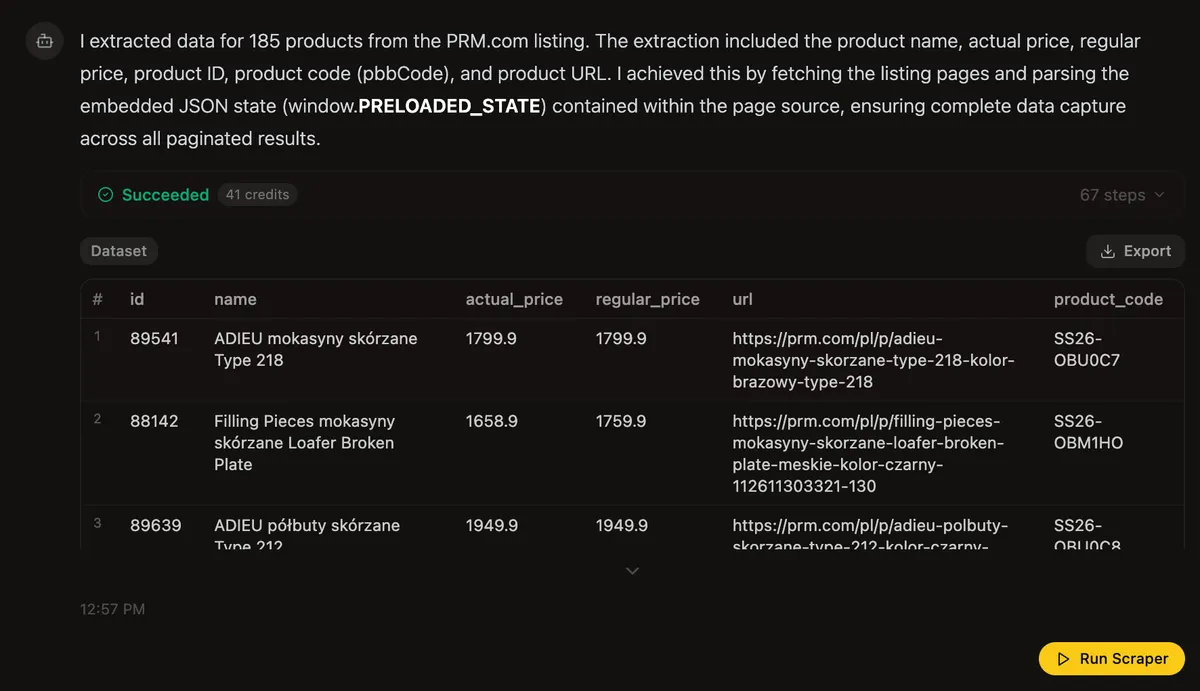
- Number of products: 185
- Data to Extract:
name,actual_price,regular_price,url,product_id,product_code - Task for Agent:
- Extract
name,actual_price,regular_price,urlfrom the catalog listing - Extract
product_idandproduct_codeby visiting every product page and clicking on drop-downs to reveal that data
- Extract
This is the kind of task that would take 2-3 n8n nodes with a URL-based scraper. With the Agent, it's a single node and one prompt.
⚙️ Step 1: Add the Parsera AI Scraper Node to Your n8n Workflow
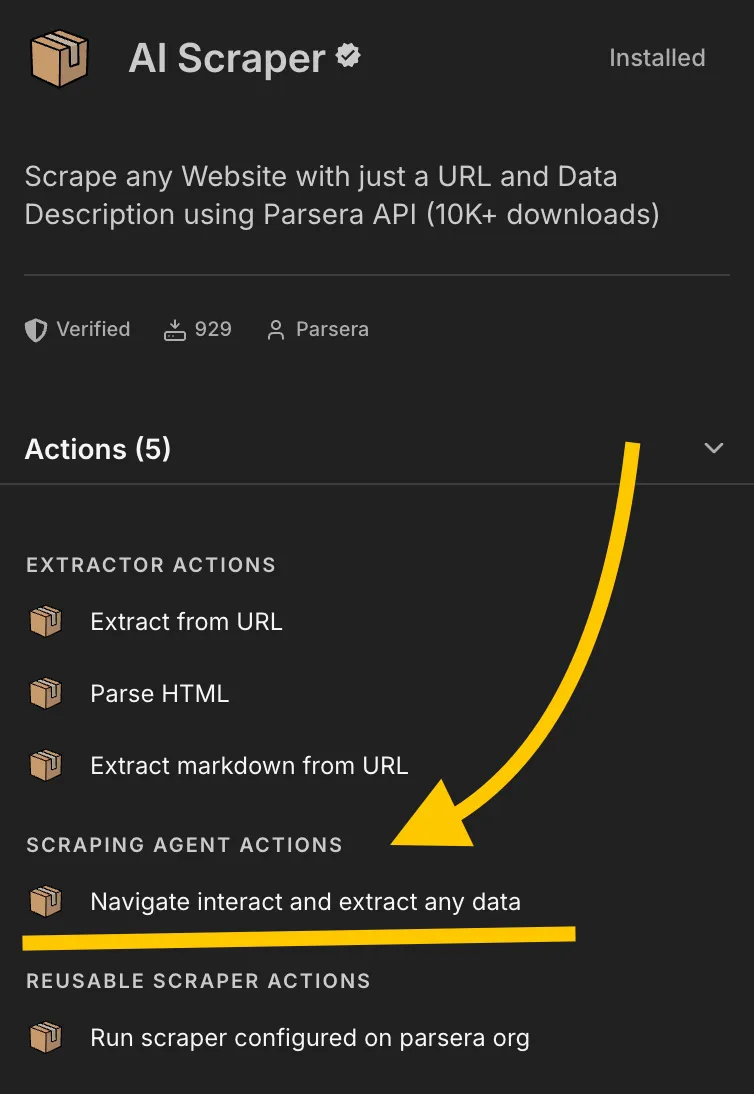
- Add a new node → search for ”AI Scraper by Parsera” or just “AI Scraper” or “Parsera” 😅
- Choose Action →
Scraping Agent Actions (Navigate interact and extract any data) - Connect your Parsera API key (get one at parsera.org)
🌐 Step 2: Set the Starting URL
- Paste the URL of the catalog listing page — not individual product URLs.
- The Agent will navigate from here — you don't need provide URLs for pages 2, 3, etc. OR individual product pages. The Agent discovers them automatically.
✍️ Step 3: Write the Agent Prompt
Example prompt used in this case: "Extract name, actual price, regular price, URL of the product page, product's ID and product's code from all the pages in this listing."
🤖 How Agent executes prompt:
- Follows paginated Product Listing / Catalog Pages to the end
- Extracts all product fields available on the catalog pages
- Visits each individual product page to find
product_idandproduct_code- Clicks on dropdowns that contain the hidden fields
- Consolidates everything into a single structured dataset
ℹ️ Prompt tips OR "How to instruct Agent to scrape any website in n8n?":
- Describe what data you want and be specific with every data field
- The Agent handles navigation by itself, but if you see there might be some complex navigation patterns (e.g. drill down into website hierarchy deeper than product page = second level and further) — specify it in the prompt
- If data requires a specific action to appear (click, expand, select), mention it:
"click the size dropdown to reveal product_id"— agent usually figures it out by itself, but if it didn't — just head it in the right direction - FYI: Agent can interact with search bars and enter search query — use it how you see fit
- Be as consistent and concise as possible in your prompt desires = the shorter and clearer your prompt — the better results you get
💎 Step 4: Run Agent and Review the Dataset
Processing time depends on catalog size and depth. For 185 products across 3 pages with individual page visits: approximately 5 minutes.
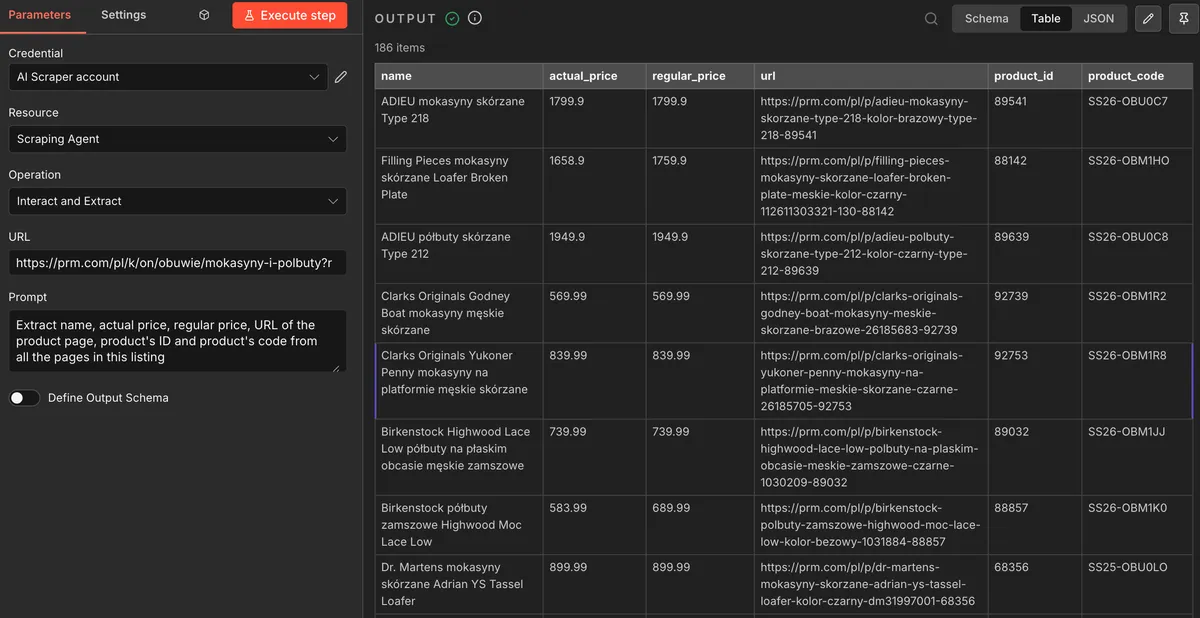
Once the Agent completes the run:
- Review the output in n8n — in our test case, all 185 products returned correctly with all 6 fields populated
- Refine if needed — Edit your prompt OR Output Schema to get updated Dataset
How to Scrape on Scale in n8n with Generated Scraping Code = Scraping API
If you like the Agent output and want to get more from the same website, you can generate a Scraping API — code generate by Parsera Agent specifically for this catalog's structure = repeatable structure
🛠️ Here's how to use Agent to Generate Scraping API for your n8n Workflow :
- Go to parsera.org and Create Scraping Agent
- Instruct the Agent do the initial scraping - Agent uses LLM and External Browser for that
- If you like returned dataset - click on
"Generate Scraping API" - Agent generates code and replicates every step of your prompt using it — navigation, pagination, clicks, field extraction...etc.
- You get ready-to-use Reusable Scraper = Scraping API that runs without LLM and an External Browser on every subsequent call.
⚠️ To use Generated Scraping API inside n8n, you first need to create and generate it in the Parsera Web App. Once generated, it becomes available as an option inside the n8n Parsera node. See how it works in this article.
When to generate a Scraping API for your n8n Workflow?
- Regular Data Monitoring (Daily / Weekly / Monthly): retail pricing, real estate availability, etc.
- Large Catalogs / Listing Extraction: 500 ecommerce product pages, etc.
- Any workflow where the same website is scraped repeatedly
💰 Why Generated Scraping API is more cost efficient?
- To scrape 185 products across 3 pages with the Agent — we need 65 credits.
- Generating the Scraping API for this Website costs 40 credits once.
- Every run of Scraping API to get ~185 products across 3 pages costs just 1 credit.
Agent VS Generate Scraping API on scale of 10,000 products (~170 pages):
| Agent | Generated Scraping API | |
|---|---|---|
| Credits needed | ~3,537 credits | ~95 credits (40 generation + ~55 recurring) |
| $29 plan (3,500 credits) | ~$29.33 | ~$0.79 |
| $59 plan (10,000 credits) | ~$20.87 | ~$0.56 |
| $169 plan (35,000 credits) | ~$17.08 | ~$0.46 |
The Generated Scraping API is 37× cheaper per run at scale — making it the only practical option for large catalogs or any recurring data extraction n8n workflow.
💎 Bottom Line
- Most n8n scraping setups have the same problem: they're URL-based, which means pagination and multi-page catalogs require extra nodes, loop logic, and manual URL management before a single product is extracted.
- The Parsera Agent solves this at the node level. One URL, one prompt — Agent navigates the catalog pagination, visits individual product pages, clicks into dropdowns, and returns a clean structured dataset directly into your n8n workflow. No URL lists. No loop nodes. No post-processing.
- For recurring use cases — price monitoring, inventory tracking, listing updates — the Scraping API generated by Agent brings the cost down by 37× compared to running the Agent every time, making large-scale, high-frequency scraping genuinely feasible inside n8n.
- If pagination is the reason your n8n scraping workflow is way more complex than it should be, the Parsera Agent is the best fix.
🌻 FAQ
-
How do I scrape multiple pages in n8n without building a complex workflow? Use the Parsera AI Scraper node in Agent mode. Paste the first page URL, write a prompt — the Agent follows all pagination automatically and returns a single structured dataset. No URL generation, no loop nodes.
-
How do I scrape infinite scroll or "Load More" pages in n8n? The Parsera Agent handles all pagination types — numbered pages, infinite scroll, and "Load More" buttons. Just describe the data you want in the prompt; the Agent figures out what navigation is needed.
-
Can I scrape a paginated website in n8n without coding? Yes. The Parsera AI Scraper node requires only a starting URL and a natural language prompt. No code, no developer resources — the Agent handles navigation, pagination, and extraction entirely.
-
How do I scrape data that's hidden behind a button or dropdown in n8n? Include the interaction in your prompt: "click the size selector to reveal product_id before extracting it." The Agent performs the action on each page before collecting data. In most cases it figures this out automatically — the prompt hint is only needed when it doesn't.
-
Can the Agent apply filters or use a search bar before scraping? Yes. The Parsera Agent can type into search bars, select filters, click dropdowns, and interact with any UI element before extracting data. Specify the filter logic in your prompt and the Agent handles it.
-
How long does scraping a paginated catalog in n8n take? It depends on catalog size and depth. In this case: 185 products across 3 pages with individual product page visits — approximately 5 minutes.
-
Do I need the Parsera web app, or can I run everything inside n8n? The Agent runs directly inside the n8n node. The web app is useful for initial prompt testing and for generating a Scraping API before running at scale — but the n8n node handles the full workflow independently.
-
Does Parsera work on Make or Zapier too, not just n8n? Yes — Parsera AI Scraper is available as a native node on n8n, Make, and Zapier.