How to Scrape Prices from a E-commerce Website Tutorial
Hey, guys! Today I'm going to use NEW Parsera Agent to extract SKU prices. For that to happen I'll ask him to:
- Go through the 3 paginated pages of given catalog and extract
name,actual_price,regular_price,urlof every SKU there, - Then visit each individual product page and locate
product_idandproduct_code, and after ... - Click on relevant drop-downs to reveal
product_idandproduct_codeand extract them and add to our dataset.
TL;DR 💬
- You can scrape prices and any other SKU data from an entire e-commerce website using Parsera — no code required, just one prompt.
- Parsera Agent navigates the website, interacts with every element (search bars, selectors, buttons, etc.), handles pagination (page numbers, infinite scroll, and "Load More" buttons), and delivers a clean dataset.
- For large-scale operations, Parsera Agent can also generate reusable scraping code to extract prices from thousands of pages efficiently.
What This Article Covers ⁉️
- How to scrape prices from an e-commerce catalog: step-by-step guide?
- How to extract any SKU data from an e-commerce website?
- How to use the Data Agent to collect data at scale?
- How to get Pricing Data regularly at any scale with Parsera?
- How to get custom Price Intelligence & Monitoring setup?
How to Scrape Prices from a Website: Step by Step
🔎 Case Overview:
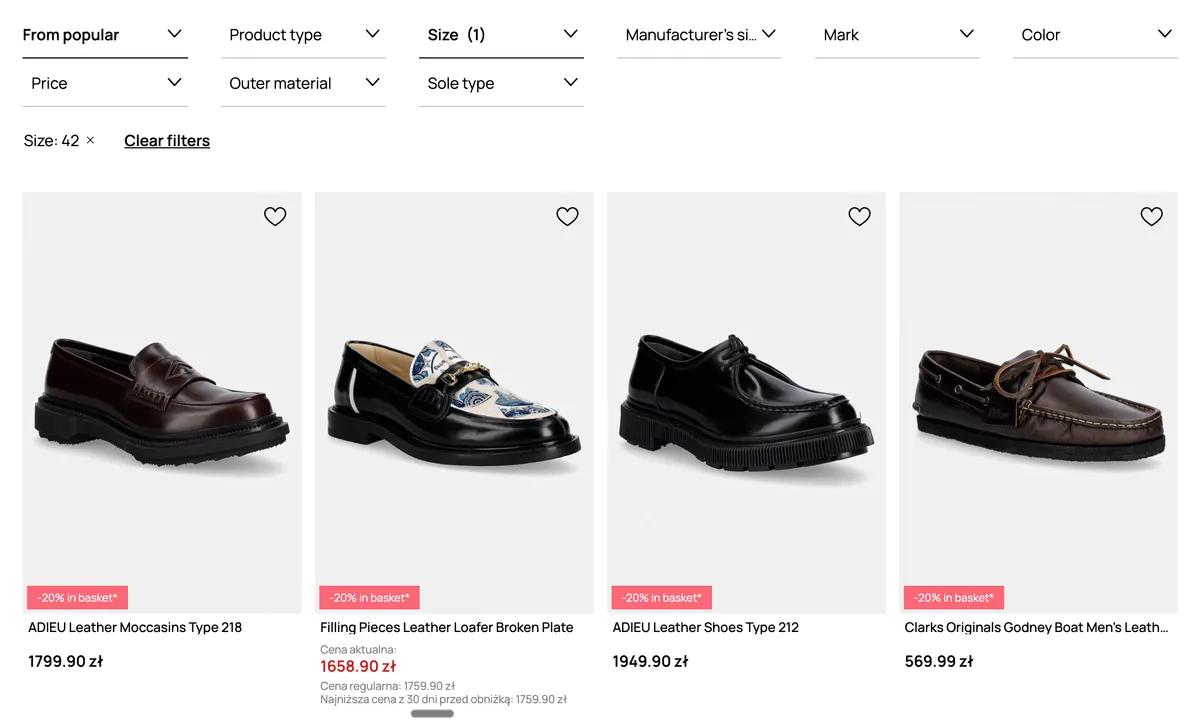
- Website: https://prm.com
- Catalog: https://prm.com/pl/k/on/obuwie/mokasyny-i-polbuty?rozmiar-ogolny=42
- Number of pages: 3
- Number of products: 176
- Data to Extract:
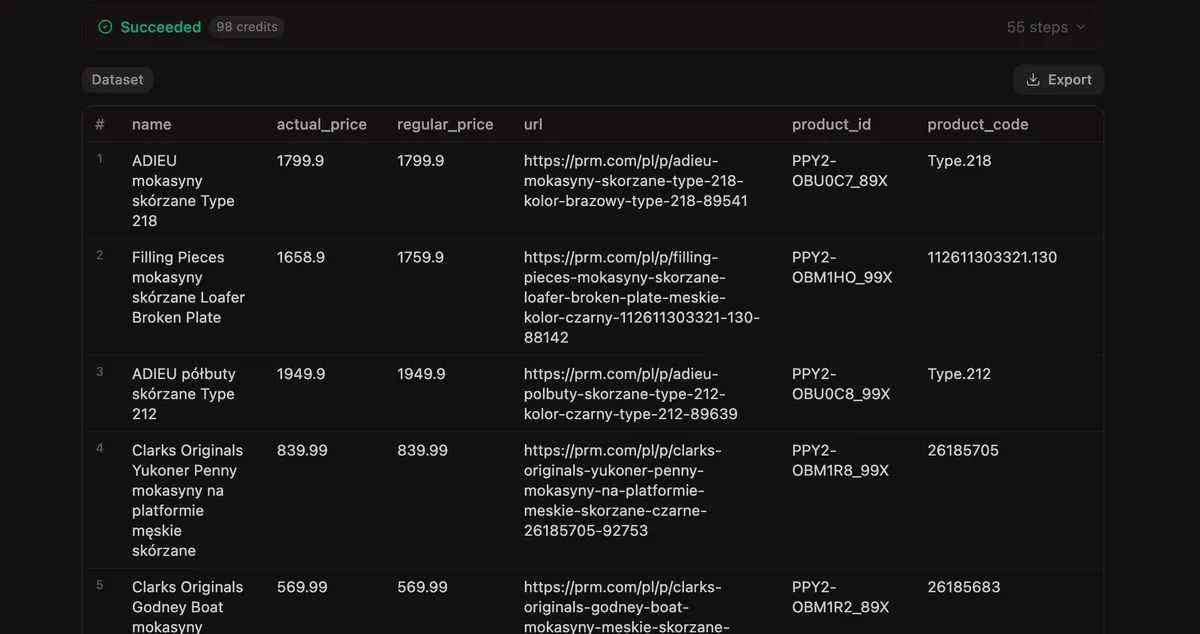
name,actual_price,regular_price,url,product_id,product_code - Task for Agent:
- Extract
name,actual_price,regular_price,urlfrom the catalog listing - Extract
product_idandproduct_codeby visiting every product page and clicking on drop-downs to reveal that data
- Extract
🤖 Step 1: Set Up the Agent
- Create Agent by clicking on the "+" button in the top left corner and then choose "Scraping Agent"
- Paste URL of the website, catalog, or product page you want to scrape prices from — into the URL field.
- Parsera Agent can navigate the website and use the search bar to filter only relevant results, so if you don't have a list of product URLs — Parsera will figure it out
- If you already have a list of product URLs: consider using Parsera AI Extractor for fast single-URL extraction

- Write Prompt. Use the Prompt field to describe what data you want and what actions the Agent should take on the website.
- Prompt Example: "Extract name, prices such as actual and regular, URL of the product page, product's id and product's code from all the pages in this listing."
- Extract Data. Processing time depends on catalog size. For this example, it took approximately 5 minutes.
💎 Step 2: Refine the Dataset
Once the Agent completes the run:
- Review the data — In our case, data is 100% correct!
- Refine the output — use a follow-up message to tune the output: add new data, remove fields, or ask the Agent to take additional actions.
🍭 How to extract any SKU data from an e-commerce website?
Beyond price, you can scrape any SKU-level attribute: brand, size, condition, last sale, bid/ask spread — everything that's present on a website. Simply update the prompt to include additional data fields or actions required to extract that data.
🔢 Step 3: Scale with a Generated Price Scraper
When scraping prices from many product pages — which is typical for price monitoring, since product pages usually share the same layout — generating a reusable price scraper is the most efficient approach.
How it works:
- A Reusable price scraper is code generated by Parsera Agent to execute a specific SKU data extraction scenario at scale — perfect for scraping e-commerce websites where catalogs and product pages share the same structure;
- Using a reusable scraper makes your price monitoring pipeline faster, more reliable, and far more feasible to maintain;
- To generate a reusable scraper — pick the relevant mode in the prompt field OR click the button with the relevant name after you've completed your first extraction using Agent.
Pro tip: Parsera Agent generates scraping code for every data extraction use case — something that previously required hiring a developer. In one click, you get a ready-to-use price scraper you can apply to StockX, Amazon, or any other e-commerce website.
How to Get Pricing Data Regularly at Any Scale 🚀
Once you have a working setup, there are four ways to automate ongoing price collection:
| # | Option | Description |
|---|---|---|
| 1️⃣ | Custom Dataset Delivery | Specify the data you need, the sources, and the delivery frequency — Parsera delivers a file in your chosen format directly to your email. |
| 2️⃣ | Parsera API | Create and call as many Agents as you need via API. Ideal for teams that want to integrate price data into their own dashboards or pipelines. |
| 3️⃣ | Custom API | Parsera trains an Agent for your specific use case and builds a dedicated API endpoint — best for enterprise or highly specialized scraping needs. |
| 4️⃣ | Automation Platforms | Parsera Agent and Extractor are available as native nodes on n8n, Make, and Zapier — no coding required for workflow automation. |
How to Get a Custom Price Intelligence & Monitoring Setup? 🛠️
At Parsera, our clients often request automated price monitoring tailored to their specific needs:
- this could include building a pipeline using automation tools like n8n, Make, or Zapier
- Or setup Custom API pipelines
✅ We're happy to guide our clients through building their own pipeline or handle everything for them, taking care of every technical aspect of data collection and providing simple, straightforward access to their data.
If this sounds like something you might be interested in discussing — email me or book a call.
Bottom Line
Price scraping is one of the most critical capabilities for any e-commerce business that wants to stay competitive. With Parsera, you can scrape prices from a website or catalog in minutes — without writing a single line of code. The Agent handles navigation, pagination, and data extraction automatically. For scale, the built-in code generator turns a one-off scrape into a reusable, scheduled pipeline. Whether you need a one-time price snapshot or continuous SKU price monitoring across thousands of products, Parsera covers all use cases from a single interface.
🌻 FAQ
-
What is price scraping? Price scraping is the automated extraction of product prices and related SKU data — name, SKU ID, availability, and more — from e-commerce websites. Businesses use it to monitor competitor pricing, track market trends, and adjust their own pricing in real time.
-
Can I scrape prices from a website without coding? Yes. Parsera Agent requires only a text prompt — no code, no browser extensions, no developer resources. You describe what you want, and the Agent handles the rest.
-
Can I scrape prices from an entire e-commerce catalog? Yes. Parsera Agent navigates multi-page catalogs and handles all types of pagination: numbered pages, infinite scroll, and "Load More" buttons.
-
What SKU data can I extract besides price? You can extract any visible data: product name, SKU ID, brand, size, color, availability, ratings, bid/ask spread, last sale price, and more — just include the fields you need in your prompt.
-
Can I scrape SKU data that's hidden and requires a specific action (e.g. a click) to be revealed? Yes. Parsera Agent can click buttons, expand drop-downs, open tabs, and interact with any UI element on the page. If the data becomes visible after an interaction, the Agent will perform that action and extract the data — just describe the steps in your prompt.
-
Can I ask the Agent to apply specific filters and then scrape the resulting data? Yes. Parsera Agent can interact with any input on the page — search bars, drop-down filters, checkboxes, sliders, and more. Simply specify the filters you want applied in your prompt, and the Agent will handle the interaction before extracting the data.
-
How do I scrape SKU prices at scale? Use the Parsera code generator to create a reusable scraper for a specific page template, then run it across thousands of URLs via the Parsera API or automation platforms like n8n, Make, or Zapier.
-
How often can I collect pricing data? As frequently as your use case requires — hourly, daily, or weekly. You can set up scheduled runs via the Parsera API or use automation platform integrations to trigger scrapes on a custom schedule.
-
Is Parsera suitable for enterprise price monitoring? Yes. Parsera offers a Custom API option where the Agent is trained on your specific use case and delivered as a dedicated endpoint — suitable for large-scale, ongoing price intelligence operations.