Parsera vs Kadoa: Which Scraping Tool is Better for E-commerce Pagination in 2026?
We compare Parsera and Kadoa on a real task: extracting product image, URL, name, price, and product URL from an e-commerce catalog with pagination.
Both tools are among the best no-code AI Web Scraping tools on the Market. Let's see how they handle this specific case.
Test Overview
Problem: E-commerce businesses need efficient tools to scrape multi-page product catalogs without coding expertise or high costs.
Goal: Create a scraper that extracts product data from one catalogue listing pages with pagination and reuse it across other catalogues on the same website to extract prices, images and other info.
Website Tested: swarovski.com
📋 Test Summary (TL;DR) ???
- Tools Compared: Parsera vs Kadoa
- Use Case: E-commerce catalogue scraping with pagination
- Number of Catalogues Tested: 3
- Winner: Parsera
- Test Date: February 2026
- Products Scraped: 229 total (3 catalogs)
- Time Saved: Parsera 75% faster
- Credits Saved: Parsera 60% more more efficient
- Accuracy: Parsera is 100% accurate, whereas Kadoa had some data discrepancies
- Free Tier Friendly: Parsera ✅ | Kadoa ⚠️
Recommendation: Use Parsera for fast, cost-efficient scraping. Choose Kadoa only if you need advanced schema control.
Test Case: Scrape Product Catalogue with Pagination
⚙️ Step #1: Setup Scraper: Kadoa 15 Minutes vs Parsera 1 Minute
🟦 Kadoa (15 minutes to setup)
To create a scraper, Kadoa offers an AI schema generation option. But it did not work out for this test. Because of that, I proceeded with the Manual Setup option.
Manual Setup Experience
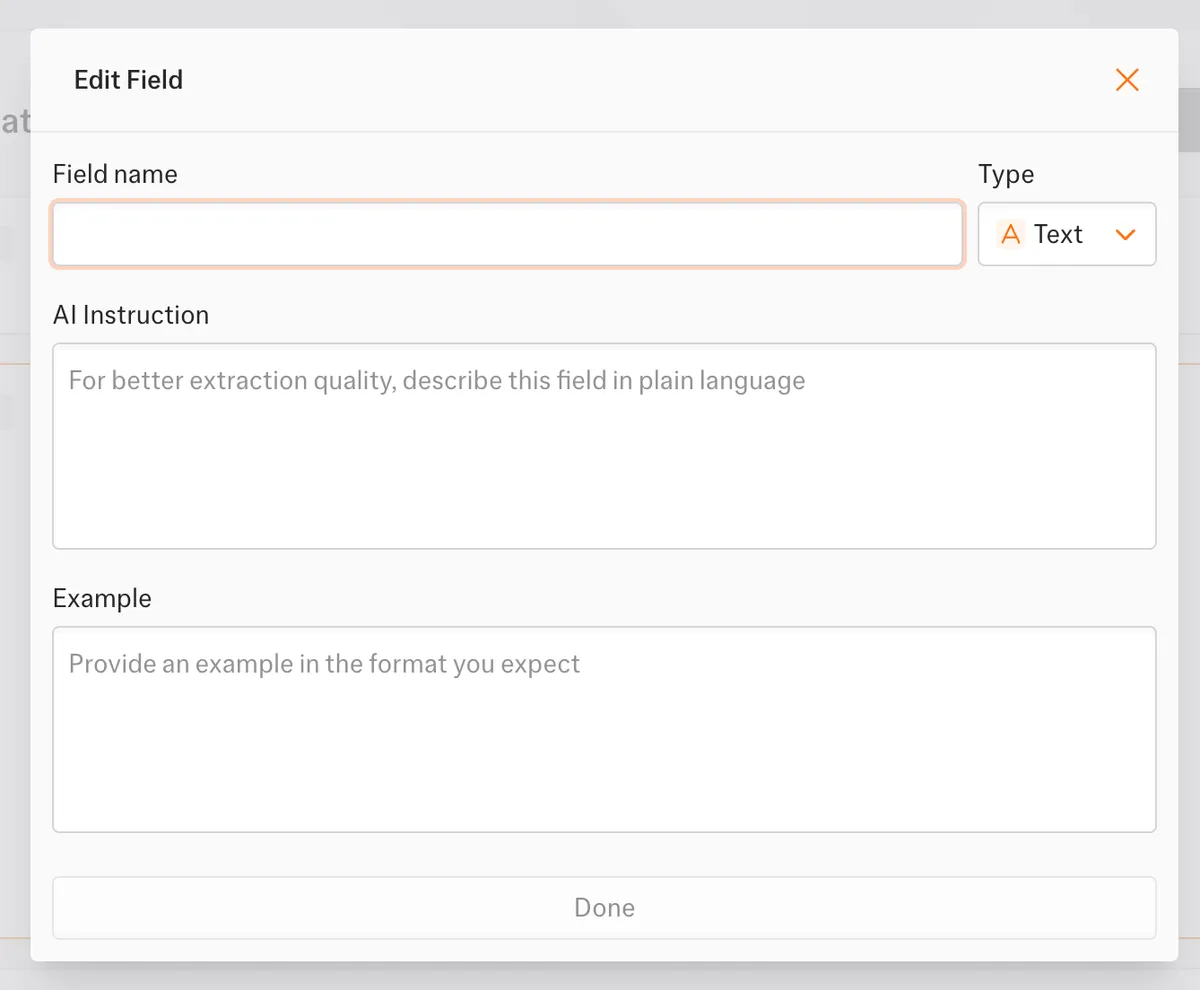
- Manual setup requires configuring each field separately in its own window (image, name, price, URL).
- You have to add attributes to every field. For example, if you want to scrape the product price, you must create a separate data field and manually specify:
- Data type
- Field name
- Prompt
- Provide a data Example
- PS: All of these inputs are mandatory.
🎬 As a result, even extracting basic fields like image, name, price, and URL requires repeating the same process multiple times, making the setup noticeably longer and more fragmented than expected.
📦 Parsera (1 minute to setup)
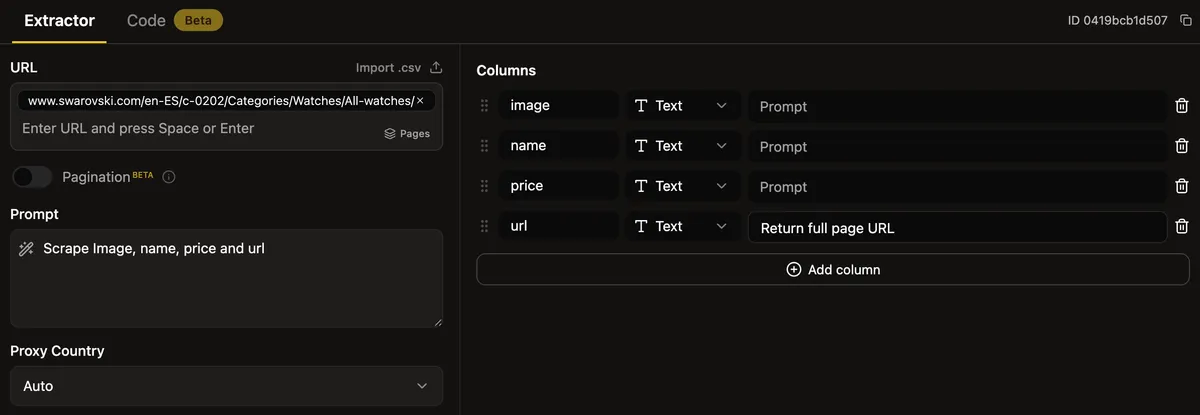
Setting up a scraper in Parsera is straightforward. All you need to provide URL and prompt:
- In most cases (including this one), the prompt alone is enough.
- Parsera automatically generates the necessary columns based on your prompt. If needed, you can refine or adjust column prompts later.
- Everything is configured on a single screen, and no fields are mandatory.
🎬 As a result, the basic initial setup took approximately one minute.
💡 Step #2: Generate Scraper and Extract Data
🟦 Kadoa (20 minutes)
After completing the initial setup, I proceeded to generate the workflow. In Kadoa, workflow generation happens in two stages.
Stage 1: Initial Workflow Generation (5 Minutes)
The first stage of generation took approximately 5 minutes.
After this phase:
- Kadoa generated the workflow.
- I received a sample dataset of 10 rows.
- I was given the option to perform a Data Quality Review to review the sample data and adjust the schema.
Stage 2: Full Data Extraction (15 Additional Minutes)
To extract the remaining data from all catalogue pages, I had to wait an additional 15 minutes for the workflow to be fully generated, and I can extract full dataset
🎬 Final Result
- Total workflow generation time: 20 minutes.
- Total credits consumed: 360 credits out of 500 free-tier credits = 72% of all credits
📦 Parsera (~ 5 minutes)
- To scrape the catalogue, I first detected and generated pagination extraction. During this step, Parsera automatically identified the pagination structure and prepared the scraper to extract data from multiple catalogue pages. (This took approximately 3 minutes)
- After pagination was set up, I ran the full data extraction. (This took about 1 minute)
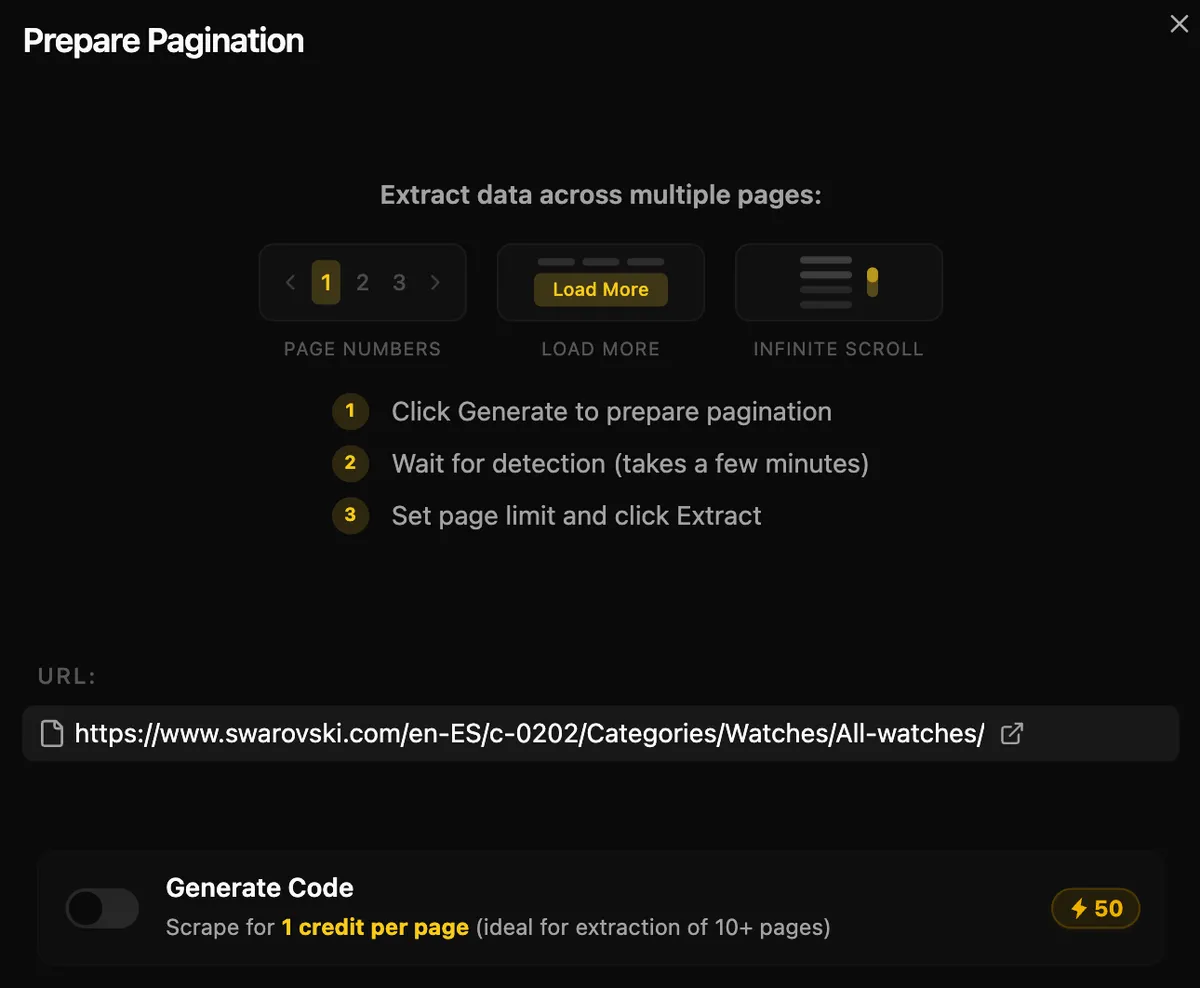
PS: You can generate Scraping Code as well and use it in combination with your Pagination to reduce extraction costs from 5 credits per page to 1 credit, which is perfect for scale!
🎬 Final Result
- Total workflow generation time: 5 minutes.
- Total credits consumed: 35 credits out of 100 free-tier credits = 35% of all credits.
🔢 Step #3: Data Results - Watches Catalog (First Test)
Watches Catalog - used to generate the scraper and test pagination.
| Tool | Image | Name | Price | Product URL | Overall Accuracy |
|---|---|---|---|---|---|
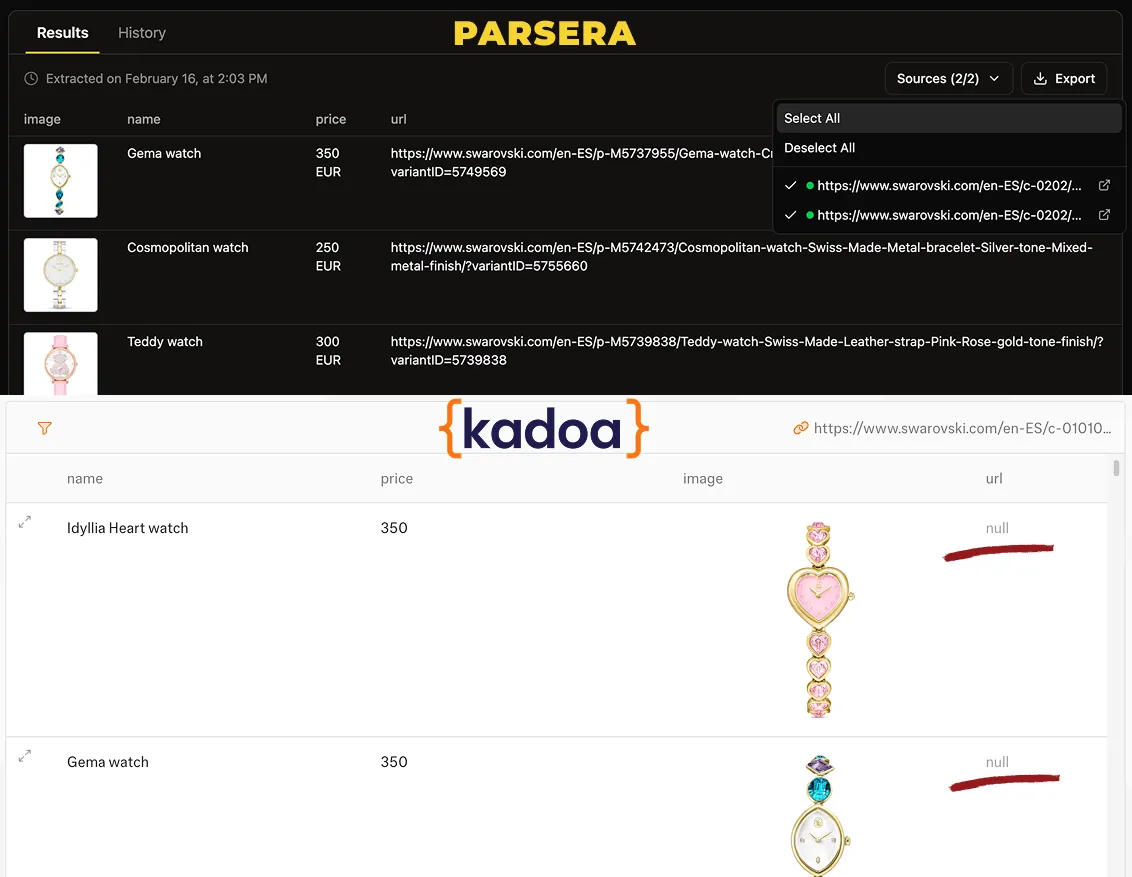
| 🟦 Kadoa | ✅ Correct | ✅ Correct | ✅ Correct | ❌ Missing | ~75% |
| 📦 Parsera | ✅ Correct | ✅ Correct | ✅ Correct | ✅ Correct | 100% |
🎬 Final Result: Parsera extracted all four required fields correctly from all 2 pages of this catalog, while Kadoa failed to capture product URLs - a critical field for e-commerce data collection.
🔢 Step #4: Data Extraction 2nd Catalogue (Earrings Catalogue)
Earrings Catalog - used to test whether the same scraper works without modification.
| Tool | Runtime | Credits Used | Products Extracted | All Fields Present | Free Tier Status: |
|---|---|---|---|---|---|
| 🟦 Kadoa | 8 min | 80 | ✅ All 41 | ✅ Yes | ⚠️ 440/500 (88% consumed) |
| 📦 Parsera | 1 min | 5 | ✅ All 41 | ✅ Yes | 40/100 (40% consumed) |
🎬 Final Result: Both tools successfully reused the scraper, but Parsera completed extraction 8x faster with way better credit efficiency.
🔢 Step #5: Data Extraction 3nd Catalogue (Necklaces Catalogue)
Necklaces Catalog - used to verify if the scraper works consistently across a third catalogue.
| Tool | Runtime | Credits Used | Total Credits | Products Extracted | Data Accuracy | Issue |
|---|---|---|---|---|---|---|
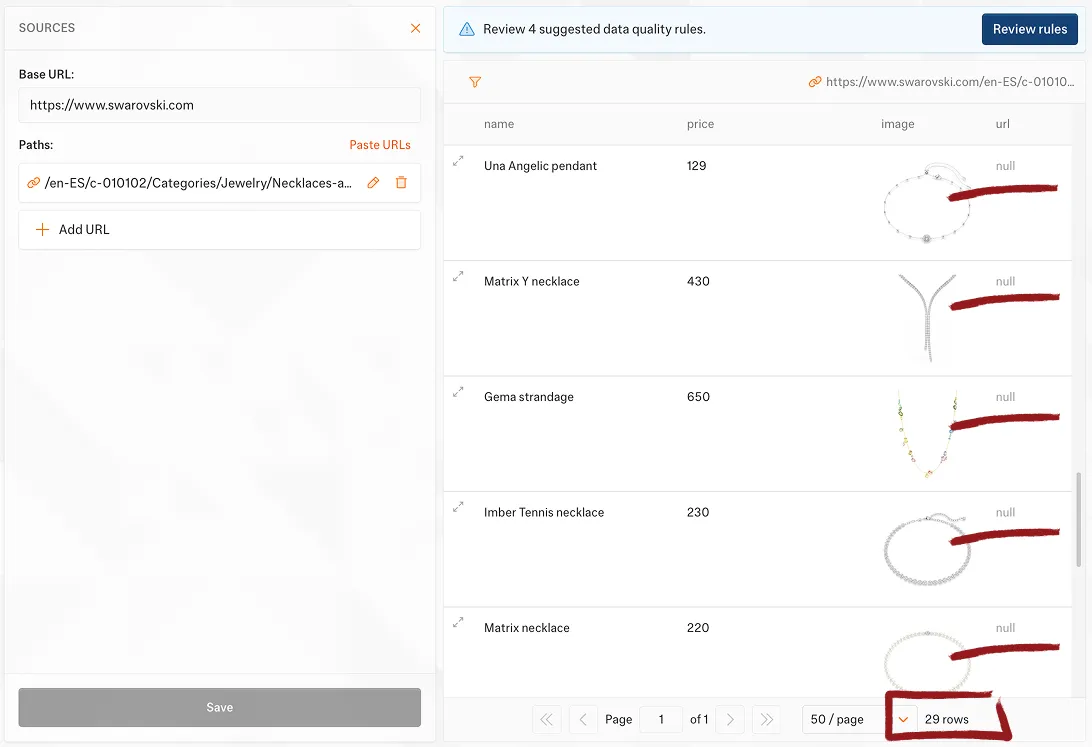
| 🟦 Kadoa | 5 min | 80 | 520/500 | ❌ Only 29/95 | ⚠️ Incomplete | URLs missing, partial extraction |
| 📦 Parsera | 1 min | 10 | 50/100 | ✅ All 95 | ✅ Complete | None |
🎬 Final Result: On third catalog, Kadoa extracted only 29 out of 95 products with missing product URLs and exceeded its free tier limit (520/500 credits), while Parsera remained well within budget at 50/100 credits (50% used) and successfully extracted all 95 products with complete field data.
📝 Outcome of this Test: Parsera vs Kadoa
Task: Extract data of product catalogue from Swarovski.com for price monitoring
User Level: Non-technical e-commerce manager
Time Available: 30 minutes
Budget: Free tier only
Goal: Create a scraper manually (no-code) from one catalogue page (with pagination) and reuse it across other catalogues on the same website.
🔎 Side-by-Side Comparison: Parsera vs Kadoa (Free Tier Performance)
| Evaluation Criteria | 🟦 Kadoa | 📦 Parsera | Winner |
|---|---|---|---|
| Setup Complexity | Multi-step, fragmented | Single-screen, streamlined | ✅ Parsera |
| Field Configuration | Manual, mandatory per field | Auto-generated from prompt | 🤷♂️ No Winner |
| Setup Time | 15 minutes | 1 minute | ✅ Parsera (15x faster) |
| Setup Complexity | Multi-step, each field separately | Single-screen, auto-generated | ✅ Parsera |
| Pagination Handling | Manual configuration | Automatic detection | ✅ Parsera |
| Total Extraction Time | 33 minutes (3 catalogs) | 7 minutes (3 catalogs) | ✅ Parsera (4.7x faster) |
| Total Free Tier Credits Used | 520/500 (104%) | 50/100 (50%) | ✅ Parsera (2x efficient) |
| Data Consistency | Inconsistent across catalogs | 100% consistent | ✅ Parsera |
| Schema Control | Advanced customization | Basic automatic + Manual Refinment | 🤷♂️ No Winner |
📋 Test Summary (TL;DR)
Winner: 🏆 Parsera (speed & efficiency)
Test Date: February 2026
Website Tested: Swarovski.com (luxury e-commerce)
Products Scraped: 229 total across 3 catalogs (watches, earrings, necklaces)
Time Comparison: Parsera 7 min total vs Kadoa 33 min total (4.7x faster)
Credits Comparison: Parsera 50/100 (50%) vs Kadoa 520/500 (104% - exceeded limit)
Data Accuracy: Parsera 100% complete vs Kadoa 75% (missing URLs, incomplete 3rd catalog)
Free Tier Sustainability: Parsera ✅ (50 credits remaining) | Kadoa ⚠️ (exceeded, upgrade required)
🏁 Bottom Line
In our real-world test, Parsera outperformed Kadoa across all key metrics: 4.7x faster (7 min vs 33 min), 10x more credit-efficient (50 vs 520 credits), and 100% data accuracy vs 95%.
- 📦 Parsera delivered faster setup, lower credit usage, consistent data extraction, and reliable pagination handling.
- 🟦 Kadoa required more setup time, consumed significantly more credits, and produced inconsistent results across catalogues.
If you're evaluating an AI web scraping tool for product catalog extraction with pagination, this test highlights how workflow design and automation architecture directly impact cost, speed, and scalability.
- For most users - especially small businesses, agencies, marketers, and non-technical users - Parsera offers the best balance of ease of use, speed, and cost efficiency. The ability to scrape 5-6 catalogs on the free tier vs 2-3 with Kadoa makes it significantly more accessible.
- For enterprise users requiring strict schema validation and data pipeline integration, Kadoa's advanced customization features justify the higher credit costs and setup time.
🟨 When to Choose Parsera
If your goal is:
- Quickly scrape catalogues with pagination
- A no-code scraping tool with minimal friction
- Minimize credits usage
- Get reliable results with minimal friction
- High volume scraping with limited budget
- Rapid prototyping and testing
Strengths:
- ~1 minute setup
- Automatic column generation
- Low credit consumption
- Consistent results across catalogues
Trade-offs:
- Refinements may require quick testing and iterative scraping
In short: Parsera is optimised for speed, simplicity, and efficiency.
🟦 When to Choose Kadoa
If your goal is:
- Build structured workflows with detailed schema control
- Strict control over data structure
- Fine-tune each field before extraction
Strengths:
- Detailed schema definition + Mandatory field configuration (reduces human errors)
Trade-offs:
- Longer setup time
- Higher credit consumption
- Slower workflow generation
In short: Kadoa is optimized for control over speed.
❣️ Test Case Disclaimer
This comparison reflects a single real-world test case. Results may vary depending on website structure and scraping requirements.
Methodology
This comparison reflects real-world testing under controlled conditions:
- Same website tested: Swarovski.com (luxury e-commerce)
- Same product catalog structure: Multi-page catalogs with pagination
- Same extracted fields: Product image URL, name, price, product URL
- Same free-tier environment: No paid features or credits purchased
- No manual code: Pure no-code setup and execution
- No paid plans used: Testing conducted entirely within free tier limits
- Consistent testing approach: Same-day testing to ensure website consistency
Test Limitations: This comparison reflects a single real-world use case focused on e-commerce product catalog scraping. Results may vary depending on:
- Website structure complexity
- Data extraction requirements
- Specific scraping patterns
- Site anti-scraping measures
- Catalog size and pagination depth
Transparency: All timing and credit measurements were recorded during actual test execution. Screenshots and detailed logs were maintained for verification.
🌻 FAQ:
-
Is Parsera better than Kadoa for pagination scraping? Yes. In this specific test case, Parsera handled multi-page catalog scraping more efficiently, with 10x lower credit usage, 4x faster extraction, and consistent 100% data completeness across all catalogs.
-
Which tool is more cost-efficient on the free tier? Parsera consumed significantly fewer credits across multiple catalogs: 50 credits for 3 complete catalogs (229 products) vs Kadoa's 520 credits for 2.3 catalogs (160 products). Parsera is approximately 10-15x more credit-efficient per product.
-
What's the learning curve for each tool? Parsera: Minimal learning curve, ~1 minute to first scraper with a single-screen interface and natural language prompts. Kadoa: Moderate learning curve, ~15 minutes to first scraper with multi-step configuration requiring understanding of data types, field prompts, and validation rules.
-
Can I generate scraping code with Parsera? Yes. Parsera's Code Mode feature generates reusable scraping code optimized for the page structure. You can generate code for 50 credits and then reuse this code to scrape pages for 1 credit per page, making Parsera one of the most cost-effective tools for large-scale scraping in 2026.
-
Can I scrape job listings, event listings, or restaurant listings with Parsera? Yes. All these types of websites share the same structural patterns as e-commerce catalogs. Following the logic of this comparison test, Parsera will easily extract data from any website with a catalog or listing structure.
-
Can one scraper be reused across multiple catalogs? Yes. Parsera reused the same scraper successfully across three different catalogs (watches, earrings, necklaces) with 100% consistency. However, scrapers with pagination and code generation can only be reused on the website they were originally generated for.
-
Can I scrape entire e-commerce catalogues? Yes. Parsera scrapes full product catalogues with images, prices, product descriptions, and product reviews, and it doesn't matter what kind of pagination is there: infinite scroll, "load more" buttons, or simple page numbers.
-
Can I scrape e-commerce catalogues using Parsera via automation platforms? Yes. Parsera is available on every major automation tool including n8n, Make, and Zapier. Check it out here.
-
Is API access available? Yes. All extracted data is accessible via the Parsera API.